Showing posts with label Compression. Show all posts

Sunday, September 8, 2013

Data Compression: Curiosity's “Focus-Merge” Images...

The Curiosity rover currently exploring Mars has an interesting image manipulation capability on board that is effectively a form of data compression, albeit a very unconventional one.

Since early in the days of digital cameras, photographers have realized that there are ways to combine multiple digital images of the same scene to provide a better composite image.  One of the first uses of this technique was to increase the camera's effective depth-of-field with a technique called focus stacking or focus bracketing.  The idea is simple enough: you take several images of precisely the same scene, but each with different focus settings.  Then you combine the parts of each image that are in focus, so that the entire resulting image is in focus.

Focus stacking is particularly useful in macro (close-up) photography, because the lenses used have very shallow depth of field.  Digital photographers routinely use focus stacking today, generally with software such as Photoshop.  You might start with images taken at 4 or 5 focus settings, then combine them carefully to get one image as a result.  This is especially useful with studio or product photography, where your subject is stationary.

From the perspective of data size, this is a very inefficient process.  To get a single final image, you have to move several full size images from the camera to your focus stacking software.  For an earthbound digital photographer, that's a few seconds of time as the memory card gets read.  For Curiosity, millions of miles away on Mars, it's an entirely different story – it has to send all those images over a very slow communications link.

Now Curiosity has a macro camera (the MAHLI imager), and it has a major depth-of-field challenge.  It's designed to capture images of rocks for geologists to study, and those rocks generally have surfaces that are far from flat.  But sending multiple images for focus stacking over that slow data link is a more bandwidth than they'd like to use.  The solution: implement focus stacking right on the Curiosity rover, so that only the final, all-in-focus image has to be transmitted.  The MAHLI team calls this technique “focus-merge”

How do they accomplish this feat, normally done with human manipulation?

First, the MAHLI team built an in-focus sensing capability into the camera that extends across the entire image.  On every image, the camera knows which pixels are in focus and which are not.  This is similar to (but more extensive than) the multiple-areas autofocus capability of most high-end digital SLRs today.  This in-focus data is stored with each image taken.

Then for any given rock that MAHLI is imaging, they'll take several photos (2 to 8, depending on the rock's depth variation) at different focus settings.  Software on board Curiosity then scans all the images pixel-by-pixel, choosing the image with the best focus for each pixel.  It also creates a visualization map showing the image selected at each pixel (using 2 to 8 gray levels, with blacker being more distant).

To anyone who has done much macro photography (as I have, with wildflowers), the result approximates magic: extreme close-up photos with essentially infinite depth-of-field.  I really can't use this technique with wildflowers, because the darned things are highly unlikely to be still at microscopic scales.  But I can envy the result nonetheless.

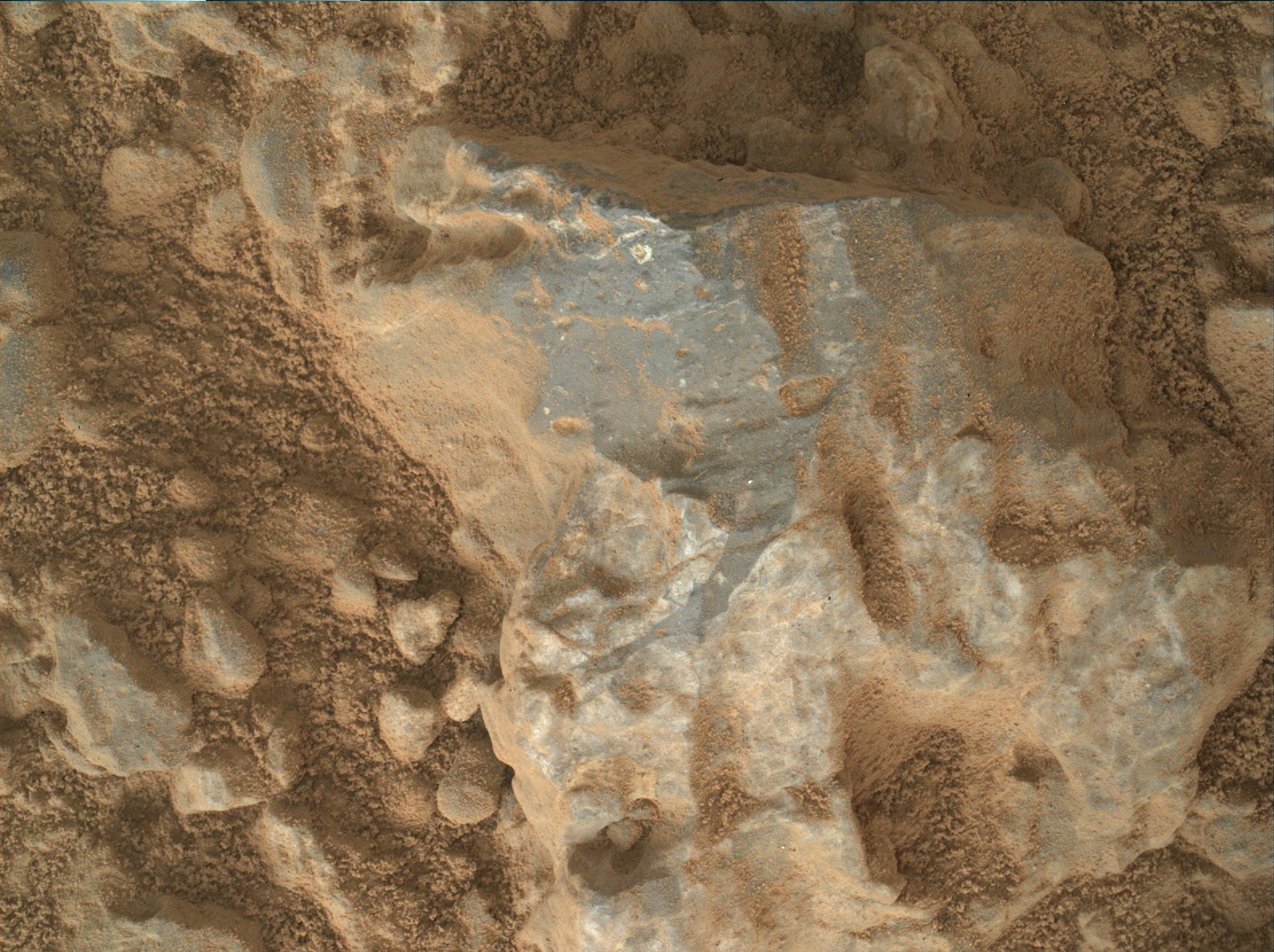
Here's a recent Curiosity focus-merge image of a rock's surface (on top) and it's matching focus map (at bottom):


Saturday, August 10, 2013

Oops!

I'm a reasonably technical guy, but this really surprised me when I first read of it: a broad range of Xerox brand copiers can change the numbers in a document being copied.  Xerox has owned up to the problem, and appears to be approaching the resolution of it in a constructive way.  It may not be just Xerox copiers, either.  As David Kriesel (the researcher who first reported the issue) points out, this can have consequences that are costly (e.g., invoice with the wrong numbers on it) or even deadly (e.g., a bridge design with the wrong specifications).

My expectation of copiers is that they will produce copies that are perfect duplicates of the original, within the resolution constraints of the device.  They might have optical distortion, color distortion, streaks, etc. – but they shouldn't just move shit around or make shit up!

But truthfully, I should have known better.  After all, I have some idea how a modern copier actually works.  They do not work like many people imagine: kind of like a camera.  Not at all.  Instead, every modern copier is actually a small, special-purpose computer with (at minimum) a scanner and a printer attached.  Fancy copiers may also have a whole bunch of paper handling mechanism attached, and possibly multiple scanners and printers, too.  But for this discussion, let's stick with a simple copier like you might have in your home office.  We have one such copier, which also works as a scanner and a printer – a multifunction device.

These copiers work like this when you press the “Copy” button:
  1. The original document is scanned into the computer's memory as an image.
  2. The image is compressed and stored on the computer's hard disk.
  3. The image is decompressed and printed.
The second step is where the problem lies.  Actually two problems.

The first one has been long recognized, and isn't the main subject of this post: many (probably most, actually) copiers store copies of the documents scanned on the hard disk indefinitely.  The hard disks can easily store millions of pages of documents, so there's not even much danger of filling one up.  That's a security problem for just about anybody, even home owners, as someone could steal that hard disk and retrieve copies of anything you've ever copied. 

The other problem is the new one, and it's related to the image compression step.  “Compression” is a method for reducing the size of the image files the copier saves to disk.  The more compression, the more pages that can be stored.  The Xerox copiers (and many others as well) allow users to configure exactly what kind of compression is used.  The most important choice is between lossless and lossy compression.  Lossless compression will make a perfect copy of the document, but without as much compression.  Lossy compression will make an imperfect copy of the document, but with (much) more compression.  Lossy compression methods (algorithms) achieve their higher compression by compromising on some aspect of the copy.  There are many different ways to do this, with different consequences for the quality of the resulting image copy.

One of the lossy compression choices Xerox provides is an algorithm called JBIG2.  The preceding link has a good general discussion of how JBIG2 works, but here's the relevant bit for this issue: for text (including numerical data), JBIG2 recognizes characters (much like OCR, if you're familiar with that) on the page.  This recognition process is far from perfect, and can easily result in one character being mistaken for another.  The JBIG2 algorithm keeps track of the context of what its compressing – if it sees a column of numbers, it's much more likely to match another number than it is to match a letter.  So the mistakes it makes in recognizing characters to match can, in fact, result in choosing the wrong number.

So what?  Well, let's say the original document has a “5”, but JBIG2 matches a “2” instead.  The copy that gets printed will have a “2” where the “5” should have been.  Oops.

The actual process is much more complicated than I just described.  There's one element of that complexity that matters for this discussion: JBIG2 can be configured for different degrees of “looseness” on the character matching.  The problem I described really only matters when this configuration is set for high levels of compression (which use loose matches).

Xerox has a firmware patch that fixes the problem by the simple expedient of disabling JBIG2 compression.  As Mr. Kriesel points out, getting that patch to all of Xerox's copiers in the field is not simple.  Inevitably there will be customers who never get the message – and if they've configured their copier(s) to use JBIG2 at high compression, they could be in for some very rude – and possibly costly or deadly – surprises...

A big oops!

Friday, March 1, 2013

Zopfli Compression...

A new open source, Apache licensed general purpose Deflate-compatible compression algorithm.  This one consumes more CPU time to get a little better compression; it's aimed mostly at web sites delivering a large amount of static content.

Sunday, September 4, 2011

Tweet Compression...

For the compression geeks.  Amusing, more than anything...